 가게
가게
에디스톤 소개 Ⅱ
3.How to set 에디스톤-URL to 봉홧불 장치
Follow the steps below to add a new URL broadcast.


1. Open the FeasyBeacon and connect to the 봉홧불 장치


2. Add a new broadcast.
3. Select the 봉홧불 broadcast type
4. Fill in URL and RSSI at 0m parameter
5. Click Add.
6. Display the new added URL Broadcast
7. Click Save (Save the new added URL broadcast of the beacon)
8. Now, the added beacon URL broadcast will show on Feasybeacon 앱
Remarks:
Enable:  Circle one left, disable the beacon broadcast
Circle on Right ,Enable the beacon broadcast.
4 무엇인가요 에디스톤-UID?
에디스톤-UID is a component of the Eddystone specification for BLE 비콘. 그것은 포함 36 16진수로 구성된 20 16진수 네임스페이스 ID, 12 16진수 인스턴스 ID 및 4 16진수 RFU, 으로 분할 3 여러 떼, 하이픈으로 구분.
Eg.0102030405060708090에이-0B0C0D0E0F00-0000
각각의 3 그룹은 섹션당 다음 문자 수를 포함해야 합니다.:
첫 번째 섹션: 20
두 번째 섹션: 12
세 번째 섹션: 4
문자는 다음부터 시작해야 합니다. 0 에게 9, 그리고 A부터 F까지의 문자. 그룹은 숫자, 문자 또는 둘의 조합으로만 구성될 수 있습니다..
5 How to use Eddystone-UID
Eddystone-UID can be used with the Android system’s Nearby. First you have to create a UID that has not been registered by anyone else. Then make the UID setting for the beacon. And register it on Google’s server and associate the UID with the corresponding push information on the Google’s server. Once the configuration completed, when the android device turns on smartphone’s screen, nearby will scans the surrounding Beacon device automatically, and the corresponding push information will be displayed.
If iOS devices need to use Eddystone-UID, must install an app,because the IOS system does not provide direct support.
6 How to setting Eddystone-UID to Beacon device
Follow the step below to add a new UID broadcast.
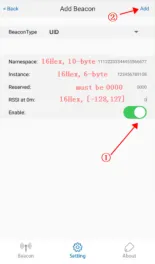


- Open the FeasyBeacon APP and connect to the beacon device.
- Add a new broadcast.
- Select UID broadcast type.
- Fill in UID Parameters.
- Click Finish.
- Display the new added UID Broadcast
- Click Save(Save the new added UID broadcast of the beacon)
- Now, the added beacon UID broadcast will show on Feasybeacon APP