 店
店
Bluetooth ビーコンのカバー範囲をテストする方法?
Some customers might find it’s not easy to get started when they receive a new Bluetooth beacon. Today’s article will show you how to test the cover range of a ビーコン when setting with different transmit power.
最近, フィジーコム makes the new mini USB ブルートゥース 4.2 ビーコン Work Range Testing. This is a supermini USB Beacon FSC-BP101, it could support アイビーコン, エディストーン (URL, UID), そして 10 slots of advertising frames. の ブルートゥース USB Beacon work with Android and iOS device. It has Android and iOS system Feasyビーコン SDK for customers. The developers can take advantage of the flexibility of the SDK and focus on their own application.
The mini beacon is a low-cost product for some economic projects, and this beacon’s max work range is up to 300m in open space.
How to make the Beacon work range testing?
For the beacon work range testing well:
- Place the Beacon 1.5m above the ground.
- Find the angle (between the smartphone and Beacon) that determines the strongest RSSI.
- Turn on Location access and Bluetooth of the smartphone to find the beacon on Feasyビーコン アプリ.
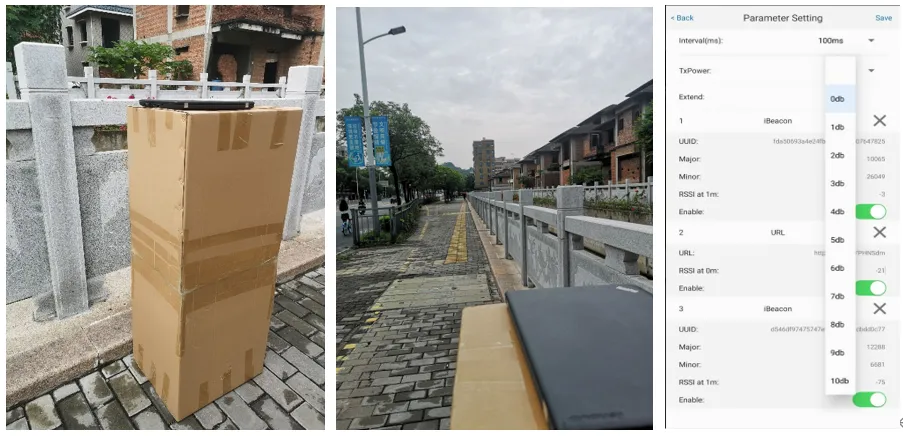
The beacon Tx power range from 0dBm to 10dBm. When the Tx power is 0dbm, the Android device work range is about 20m, the iOS device work range is about 80m. When the Tx power is 10dBm, the max work range is about 300m with iOS device.
For more information about the mini USB beacon, welcome to visit the product link: https://feasycom.com/product-Mini-Size-USB-Powered-Bluetooth-Beacon.html