Eddystone Introduction Ⅱ
3.How to set Eddystone-URL to Latarnia morska urządzenie
Follow the steps below to add a new URL broadcast.


1. Open the FVEASYBEACON and connect to the latarnia morska urządzenie


2. Add a new broadcast.
3. Select the Latarnia morska broadcast type
4. Fill in URL and RSSI at 0m parameter
5. Click Add.
6. Display the new added URL Broadcast
7. Click Save (Save the new added URL broadcast of the beacon)
8. Teraz, the added beacon URL broadcast will show on Feasybeacon App
Remarks:
Enable:  Circle one left, disable the beacon broadcast
Circle on Right ,Enable the beacon broadcast.
4 Co jest Eddystone-UID?
Eddystone-UID is a component of the Eddystone specification for Ble latarnie. Zawiera 36 cyfry szesnastkowe składające się z 20 cyfry szesnastkowe Identyfikator przestrzeni nazw, 12 cyfry szesnastkowe Identyfikator instancji i 4 cyfry szesnastkowe RFU, podzielić na 3 grupy, oddzielone myślnikami.
Eg.0102030405060708090A-0B0C0D0E0F00-0000
Każdy z 3 grupy muszą zawierać następującą liczbę znaków w każdej sekcji:
Pierwsza sekcja: 20
Druga sekcja: 12
Trzecia sekcja: 4
Znaki powinny być liczbą od 0 Do 9, i litery od A do F. Grupa może składać się wyłącznie z cyfr, liter lub kombinacji obu.
5 How to use Eddystone-UID
Eddystone-UID can be used with the Android system’s Nearby. First you have to create a UID that has not been registered by anyone else. Then make the UID setting for the beacon. And register it on Google’s server and associate the UID with the corresponding push information on the Google’s server. Once the configuration completed, when the android device turns on smartphone’s screen, nearby will scans the surrounding Beacon device automatically, and the corresponding push information will be displayed.
If iOS devices need to use Eddystone-UID, must install an app,because the IOS system does not provide direct support.
6 How to setting Eddystone-UID to Beacon device
Follow the step below to add a new UID broadcast.
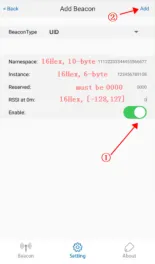


- Open the FVEASYBEACON APP and connect to the beacon device.
- Add a new broadcast.
- Select UID broadcast type.
- Fill in UID Parameters.
- Click Finish.
- Display the new added UID Broadcast
- Click Save(Save the new added UID broadcast of the beacon)
- Teraz, the added beacon UID broadcast will show on Feasybeacon APP