 店
店
エディストーン入門Ⅱ
3.How to set エディストーン-URL to ビーコン デバイス
Follow the steps below to add a new URL broadcast.


1. Open the Feasyビーコン and connect to the ビーコン デバイス


2. Add a new broadcast.
3. Select the ビーコン broadcast type
4. Fill in URL and RSSI at 0m parameter
5. Click Add.
6. Display the new added URL Broadcast
7. Click Save (Save the new added URL broadcast of the beacon)
8. 今, the added beacon URL broadcast will show on フィージービーコン アプリ
Remarks:
Enable:  Circle one left, disable the beacon broadcast
Circle on Right ,Enable the beacon broadcast.
4 とは何ですか エディストーン-UID?
エディストーン-UID is a component of the Eddystone specification for BLE ビーコン. 含まれています 36 で構成される 16 進数 20 16 進数の名前空間 ID, 12 16 進数のインスタンス ID と 4 16 進数 RFU, に分割する 3 グループ, ハイフンで区切って.
Eg.0102030405060708090あ-0B0C0D0E0F00-0000
それぞれの 3 グループにはセクションごとに次の数の文字が含まれている必要があります:
最初のセクション: 20
第 2 セクション: 12
第三セクション: 4
文字は次の番号でなければなりません 0 に 9, そしてAからFまでの文字. グループは、数字、文字、または両方の組み合わせだけで作成できます。.
5 How to use Eddystone-UID
Eddystone-UID can be used with the Android system’s Nearby. First you have to create a UID that has not been registered by anyone else. Then make the UID setting for the beacon. And register it on Google’s server and associate the UID with the corresponding push information on the Google’s server. Once the configuration completed, when the android device turns on smartphone’s screen, nearby will scans the surrounding Beacon device automatically, and the corresponding push information will be displayed.
If iOS devices need to use Eddystone-UID, must install an app,because the IOS system does not provide direct support.
6 How to setting Eddystone-UID to Beacon device
Follow the step below to add a new UID broadcast.
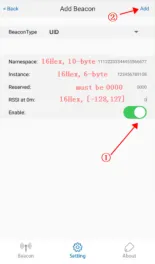


- Open the Feasyビーコン APP and connect to the beacon device.
- Add a new broadcast.
- Select UID broadcast type.
- Fill in UID Parameters.
- Click Finish.
- Display the new added UID Broadcast
- Click Save(Save the new added UID broadcast of the beacon)
- 今, the added beacon UID broadcast will show on Feasybeacon APP